Train with power. Pay once.
Indoor cycling without another subscription. RitmoSync connects to your FTMS smart trainer, shows live power zones, and runs structured workouts — free in Chrome or as a Mac app.
Open in Chrome. Pair your trainer. Go. Use the web app in Chrome or Edge (Web Bluetooth), or install the Mac desktop app. No account required for the free tier.
 Open web app — free
 Download for macOS
Web Bluetooth requires Chrome or Edge on desktop. Not supported in Safari or most mobile browsers. Mac app requires Apple Silicon (M1 or later).
Why riders choose RitmoSync
-
No subscription
Train with power — pay once. Pro is $39.90 one-time for history, custom programs, and FIT export.
-
Your data stays local
Workouts live on your device. No cloud sync, no account for the free app — privacy-first by design.
-
Fast to try
Connect your trainer in minutes. Free tier in Chrome or Edge — structured intervals, real power data.
-
Serious training
FTP zones, built-in programs, and FIT export to Strava. Zwift is fun — RitmoSync is focused.
-
Raw stream + windowed stats
Pro exports the full 1-second CSV and ready-made 30-second and zone summaries — median, quartiles, Ritmo Power, and more per block. Raw data and aggregated windows in one place. See the column guide.
Connect your trainer. See your zones. Ride.
View live metrics and zone tracking for free. Pro unlocks custom programs, saved history, and CSV/FIT export.
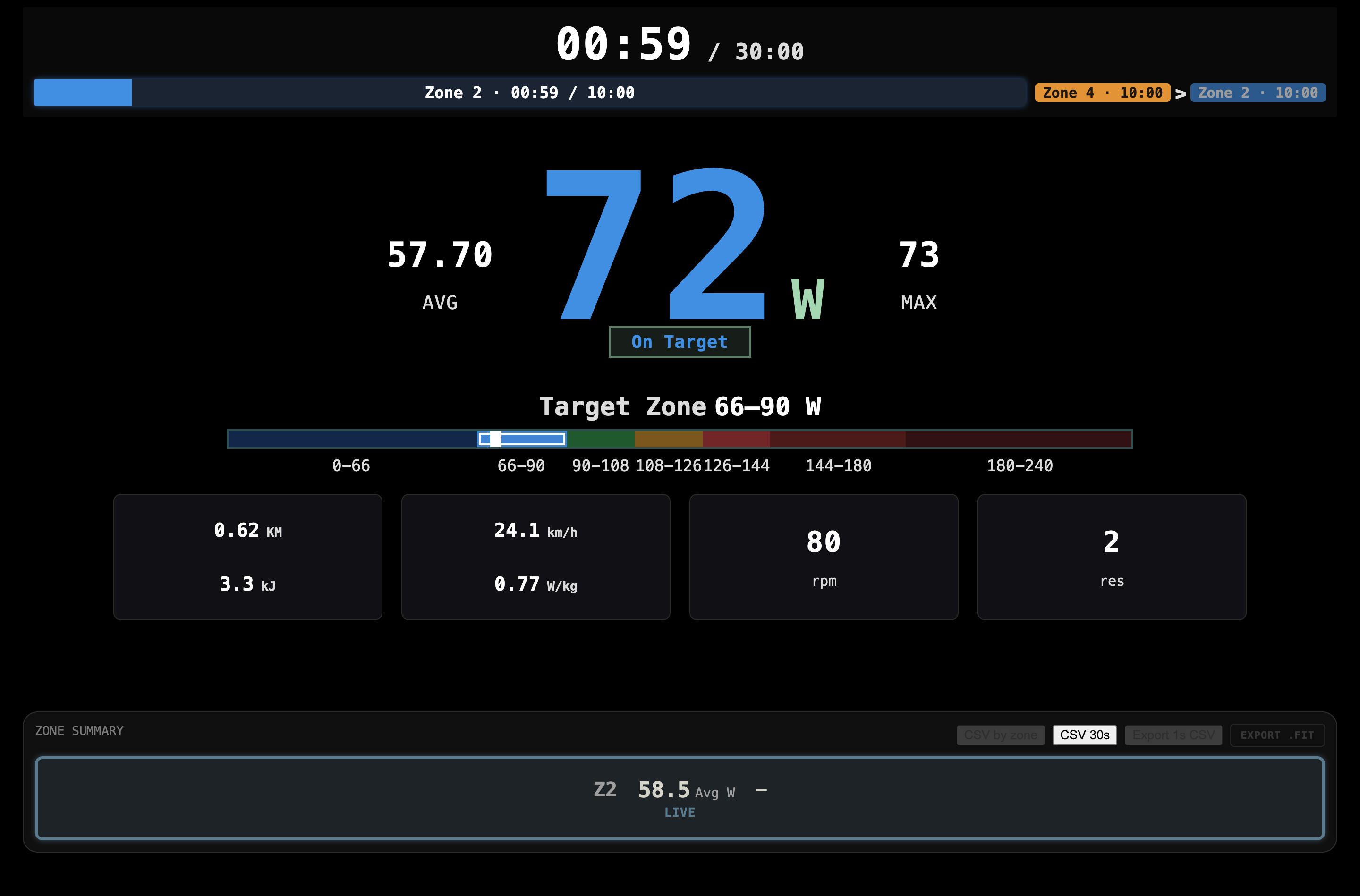 Live power & zones
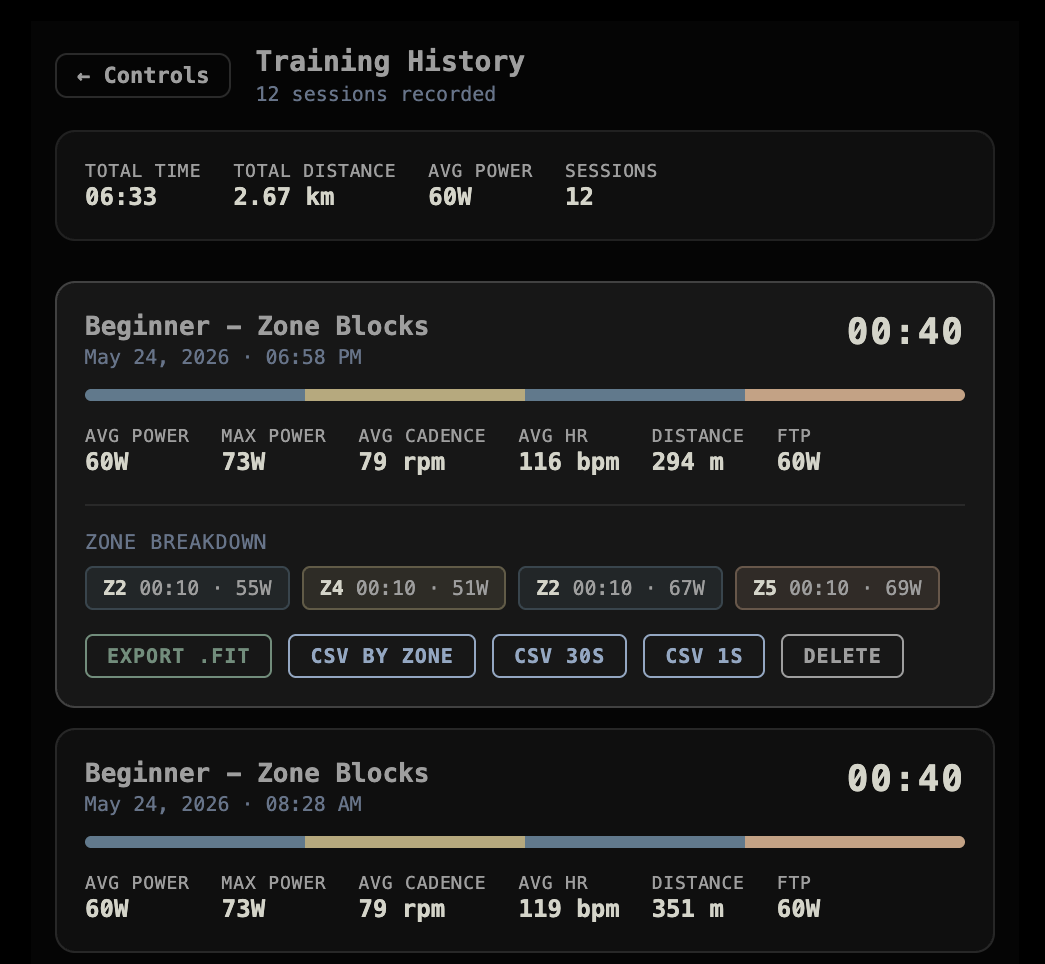 Training history & FIT export
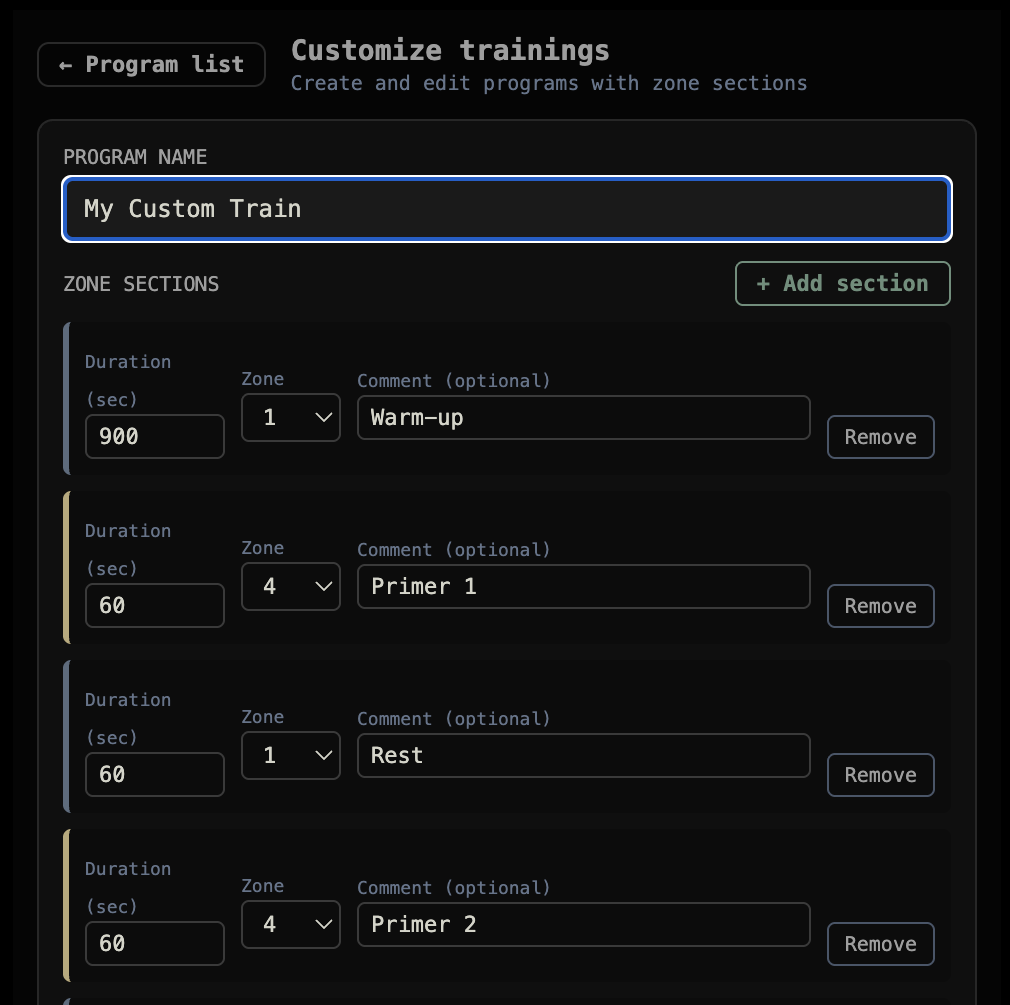 Custom workout builder
How it works
-
Step 1: Open the app
Go to RitmoSync web app in Chrome or Edge, or download the Mac app and open the DMG to install.
-
Step 2: Connect your trainer
Pair your FTMS-compatible smart trainer or power meter via Bluetooth. Not sure if yours qualifies? Run the free compatibility test or see our FTMS equipment guide.
-
Step 3: Set FTP and pick a workout
Enter your FTP in the menu to calibrate zones. Choose a built-in program, build your own intervals (Pro), or follow open riding. Need FTP? See our 20-minute test guide.
-
Step 4: Ride and review
Watch live zones and session stats as you ride — the free tier shows metrics on screen only. With Pro, sessions are saved locally and you can export CSV or FIT to Strava.
Your workouts stay on your device
Structured intervals. Real power data. No account required.
- App settings stay on your device — not on our servers. Pro workouts and custom programs are stored locally too.
- No cloud sync or account is required for the free app.
- Use Download my data in the app menu to export settings and local app data as JSON.
- Pro license validation calls our license API only to verify your key; it does not upload ride history. See our Privacy Policy for details.
Common questions
- Why not just use Zwift?
- Zwift is great for worlds and group rides. RitmoSync is for focused power workouts, local data, and a one-time Pro price. Read the comparison.
- Is it compatible with my trainer?
- Works with FTMS-compatible trainers and many power meters over Bluetooth. Still beta — test pairing free in the app before buying Pro. See compatible equipment.
- Safari or iPhone?
- Web Bluetooth needs Chrome or Edge on desktop. Mac app for Apple Silicon. Mobile Safari isn’t supported yet.
- $40 is expensive
- Compare to roughly $180–240 per year for major platforms. One-time Pro if you want history and FIT export. Free tier covers live training.
- It’s beta — should I wait?
- Free tier lets you validate trainer pairing risk-free. Pro buyers get roadmap features as they ship.
Roadmap
What we are working on next.
-
In progress
iPhone app
Native iOS app with CoreBluetooth — Web Bluetooth does not work on iPhone today.
-
In progress
Windows desktop app
Native installer for Windows alongside the existing Mac build.
-
Planned
Heart rate monitor support
Pair a Bluetooth heart rate strap and track HR alongside power and zones.
-
Planned
Treadmill support
Connect FTMS treadmills for indoor running with pace and incline metrics.
-
Planned
More trainer profiles
Broader FTMS and power-meter compatibility testing and fixes.
RitmoSync Pro
$39.90 One-time license · no subscription
When you want structured power work without another monthly bill.
- Full training history stored locally
- Custom workout programs
- Export the 1-second stream plus 30s and zone CSV summaries — or FIT for Strava and TrainingPeaks. CSV column guide
Purchase and license delivery via our checkout provider. See Terms of Service.